So how does Angular work? Whats the structure of Angular? To better show this, lets create a new folder. On the command line (make sure youre in the project directory) type ng generate hello-world. This command will generate a new component for us.
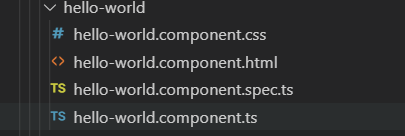
Angular automatically creates this folder with these files included once we run the command. This file is made up of an html file, a css file, a typescript file, and a test typescript file.
Through the typescript named hello-world.component.ts file, Angular packages these files together in the same Component, then exports those components into a class.
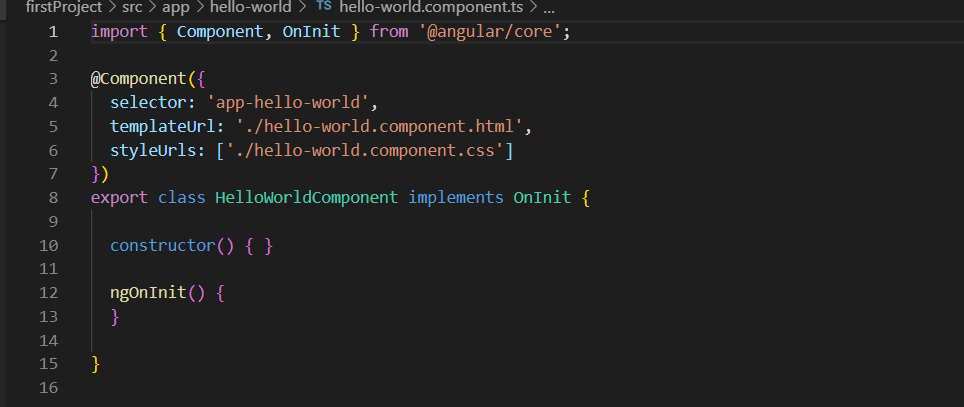
As we can see, this .ts file contains the css and the html for hello-world. They are packaged together with the @Component tag, signifying to Angular that these are components.
Components are the basis for how angular works. Angular will divide your website up based on components that you create (you get to decide how your page is divided up) but angular takes care of the rest. For example, every website has a header, footer, and possibly a sidebar. In Angular, you treat each different part of the site as a component. And sometimes, those components could have components inside of them, allowing for lots of customization.
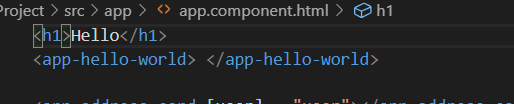
Back to the project, just because we created this new component doesnt mean itll show up on the site. Thats what the app.component.html file is for. The app.component.html file acts as the “main” html file where everything will get stored. Its really simple to implement too! On the hello-world.component.ts file we see a variable called selector: app-hello-world. This acts as a name for this whole component, that way Angular knows if we use this particular tag, we are referring to this component.
All you have to do is add that tag to the app.component.html file and there, you added the hello-world component to your website!
This post was meant to just break down the basic structure of Angular and give a brief overview of component and how they work. The next post will be going over some simple functionality to an Angular application.
 Danny's Programming blog