Now that we understand the main components of Angular, lets talk functionality. We will be creating a new component, this one will be for having the date and time appear on a page.
Create a new component called date-time (ng generate date-time). Once thats created, go into the date-time.component.ts file and add the following code.
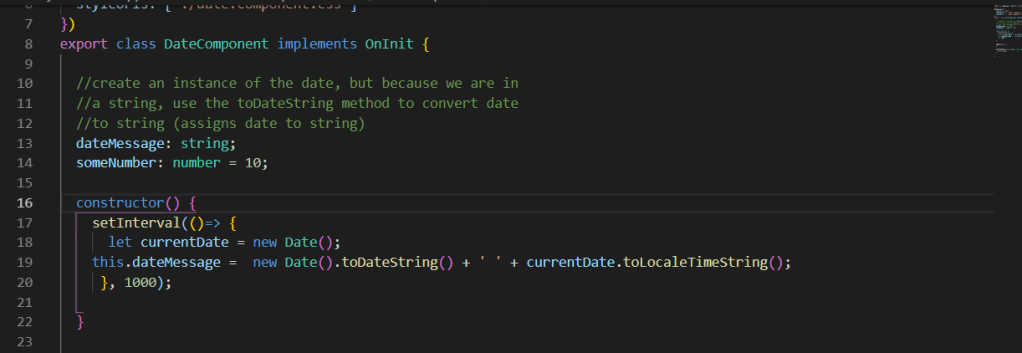
What we’re doing here is, after exporting the class, we create a variable String called dateMessage. Inside the constructor, create another Date variable. We will use the setInterval method to keep the time updated, and the string dateMessage will show the current date, along with the local time (counting every second).
We have the logic set, but we need the logic to appear on the html. In the date-time.component.html, we need to find a way to pass the dateMessage variable to the html page. We can achieve this by using {{ }}.
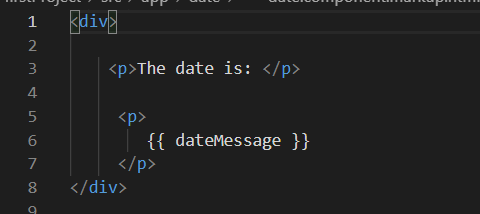
The double curly brackets is the main way in Angular to achieve one way data binding. The double curly brackets lets Angular know that what we are passing through is a variable, it will then look for that variable and plug it into our page.
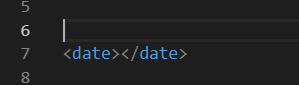
We’re not finished yet, we have the html and typescript ready for our date-time page, but we still need to add the page to our app.component.html file (remember what the name of the selector was)
Now we have an idea of basic functionality in Angular. In the next post, I will briefly cover some special Angular functions!
 Danny's Programming blog